
ClubGG Setup
Follow this guide to learn how to best configure your ClubGG client for use with IntuitiveTables.
-
Note: The custom bet buttons/bet box overlays and Set Bet Size hotkeys are now available for ClubGG in IntuitiveTables v2.1.4.53 (or higher). To update, visit IntuitiveTables Versions and download the latest version at the top.
Disable Focus Stealing
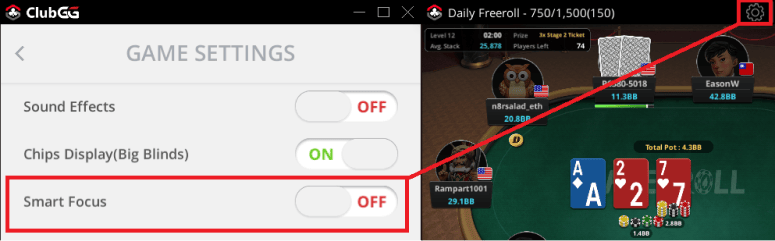
- It is suggested to disable "Smart Focus" if playing on multiple sites.
-
Troubleshooting
The bet buttons overlay stopped appearing after a ClubGG update.
If your poker client has updated you may need to update IntuitiveTables. First check to see if the newest version of IntuitiveTables works on the new client update, and if not please contact support.
Will advanced overlays, auto bet sizing, and auto timebank be added to IntuitiveTables for ClubGG?
Unfortunately ClubGG does not permit these features on their client so we are unable to add them unless their stance changes in the future.
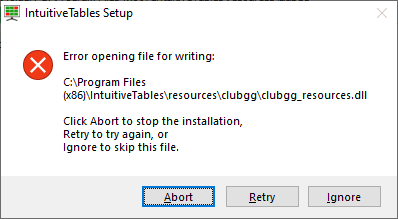
"Error opening file for writing" when updating IntuitiveTables
ClubGG sometimes holds on to our resources file when updating IntuitiveTables. You can fix this by closing ClubGG and then clicking Retry. If you don't want to close ClubGG you can wait 3-5 minutes until ClubGG releases our resource file and try updating again.
Note: Still having an issue with ClubGG? Ask in Discord or contact support@intuitivetables.com.
Back to Site SetupReady to get started?
The free two week trial includes access to all available features. No credit card is required.