
WPTGlobal Setup
(WPT Global, Nexa Poker)
Follow this guide to learn how to best configure your WPTGlobal client for use with IntuitiveTables.
-
Note: IntuitiveTables is approved for use on WPT Global. We work closely with the WPT Global security team provide only the features they allow. For confirmation of approval see the Official 2+2 reponse.
Configure Bet Buttons
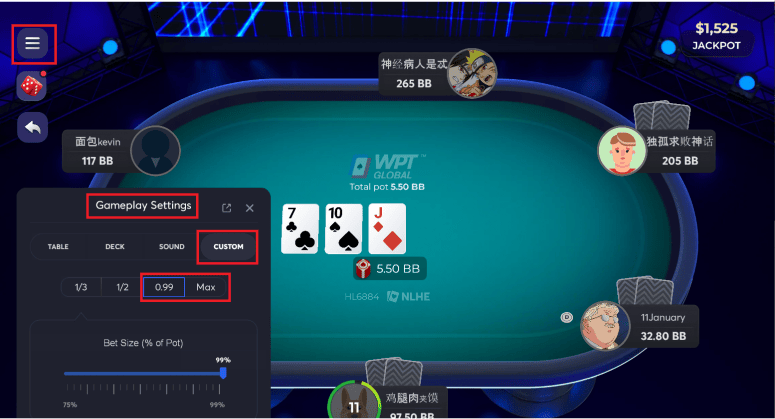
- Configure button 3 to 0.99 % pot. This will allow bet buttons/bet box overlays to work properly in % mode.
- Make sure button 4 is set to "Max" for All-In hotkey to work.
-
Note: Auto-Bet of All-In hotkey or bet button overlays is not allowed by WPTGlobal/Nexa Poker and will not be supported for this site.
-
Match Chips Converted State
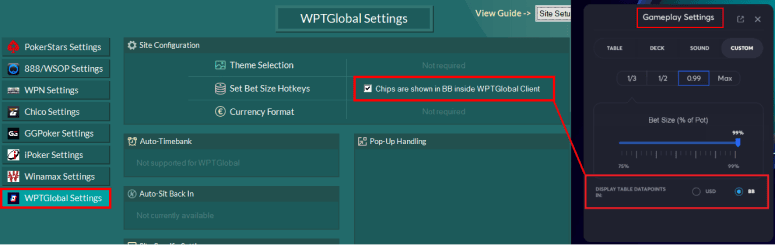
- If you converted your chips to BB inside WPTGlobal/Nexa Poker, you must update this inside IntuitiveTables settings as well.
- This will allow the mouse wheel and betting overlays to work properly.
-
Language
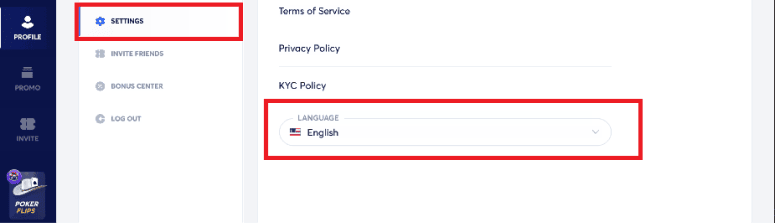
- For certain features to work properly such as custom bet buttons and fold when check is possible, WPT Global will need to be set to English.
-
Keep Bet Area Visible
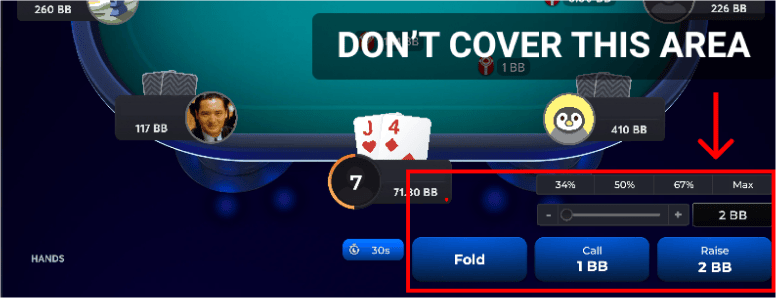
- Make sure to not cover the bet box or client bet buttons with your HUD, or any overlays like bet buttons or bet box.
- Note: If you cover this area with one of our overlays or an outside HUD (like PT4 or HEM) the mouse wheel, custom bet buttons, or bet box overlays may be unable to set the bet properly.
-
Apply for up to 50% Rakeback (Optional)

- Access exclusive WPT Global promotions and up to 50% rakeback weekly.
- See our WPT Rakeback Guide to apply.
-
Troubleshooting
My bet sizing hotkeys are not working on WPTGlobal/Nexa Poker.
Set Bet Size, Bet Slider Button, and Overlay Button hotkeys are not allowed by WPTGlobal/Nexa Poker therefore support for them has been removed.
My hotkeys, mouse scroll, or bet buttons aren't working.
First try updating to the newest version of IntuitiveTables. See IntuitiveTables Versions. If hotkeys or overlays are still not working please contact support.
Note: Still having an issue with WPTGlobal? Ask in Discord or contact support@intuitivetables.com.
Back to Site SetupReady to get started?
The free two week trial includes access to all available features. No credit card is required.