
SupremaPoker Setup
Follow this guide to learn how to best configure your SupremaPoker client for use with IntuitiveTables.
-
Multi-Tabling Setup
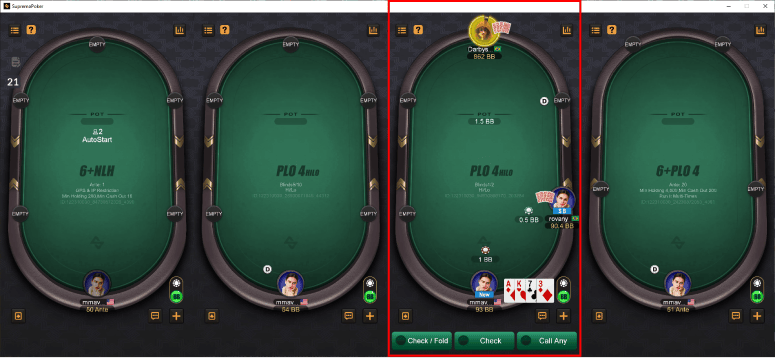
- IntuitiveTables now supports multi-tabling on the Suprema Poker desktop application!
- We suggest enabling "Enable border around focused table" in the Settings -> Table Borders tab so you know which table you are acting on.
-
Configure Bet Buttons
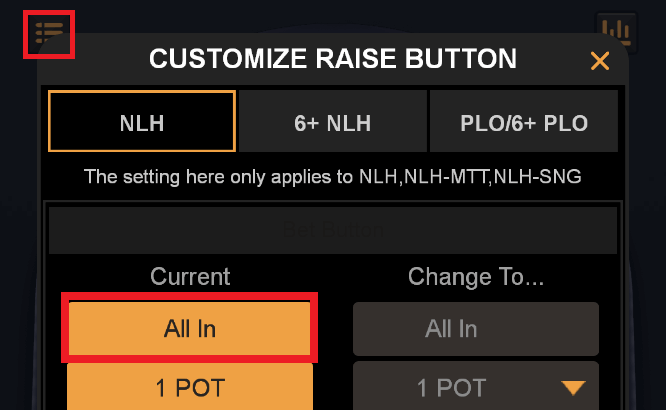
- Make sure the top bet button is set to All-In for pre-flop and post-flop (this is the default setting).
-
Bet Slider Button Hotkeys (optional)
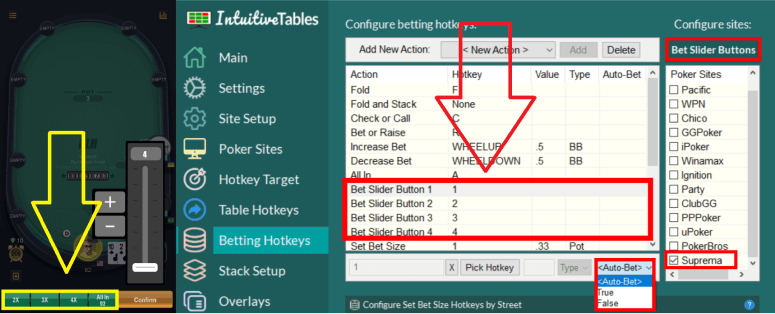
- Bet Slider Button hotkeys can be configured to click the small bet size buttons 1-4 (pictured above).
- Auto-Bet can be set to True to allow for immediate betting of these buttons.
Note: These hotkeys by default will initially click the "Raise" button on the table then trigger the Bet Slider hotkey. Be sure to NOT use these hotkeys when facing an all-in otherwise the all-in button may be clicked.
-
Setup for Numpad Bet Sizing (optional)
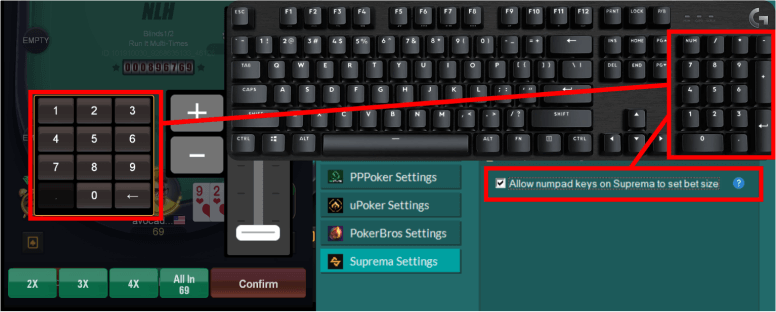
- In the Site Setup tab for SupremaPoker, enable "Allow numpad keys on SupremaPoker to set the bet size".
- This feature will allow Numpad0-9, NumpadDot, and NumpadSub (to delete a number) to type directly into the bet box to modify the sizing.
- This will also bring up the bet slider bar by clicking the "Raise" button on the table and then automatically set focus to the bet box. DO NOT use this feature when facing an all-in.
-
Troubleshooting
How do I make my Suprema tables fit better in the grid?
Tables on emulator sites are much taller than normal tables. In order to fit emulator tables better in the grid, it is suggested to add specific emulator slots. To see how to do this, see steps #2 and #3 in the Emulators Guide.
Note: Now that multi-tabling is supported on SupremaPoker you may want to leave room horizontally for the table to grow as you add more tables so you don't cover existing tables.
Can I play on SupremaPoker with LDPlayer or Nox?
It is not suggested to play on SupremaPoker using an emulator such as LDPlayer or Nox. Several users have contacted us and said they were banned for playing on SupremaPoker using an emulator. The desktop application for SupremaPoker is still allowed.
Note: Still having an issue with SupremaPoker? Ask in Discord or contact support@intuitivetables.com.
Back to Site SetupReady to get started?
The free two week trial includes access to all available features. No credit card is required.