
QQPK Setup
(QQPoker)
Follow this guide to learn how to best configure your QQPK client for use with IntuitiveTables.
-
Import Custom Site
QQPK is a community-maintained custom site within IntuitiveTables. To use it, download and unzip the latest version of QQPK from Community Maintained Custom Sites.
Note: Note: QQPK now supports two display modes: Landscape (wide tables) and Portrait (tall tables). Make sure to download the custom site profile that matches the mode selected in your QQPK settings. Landscape Mode is recommended as it supports more features, such as mouse wheel scrolling.
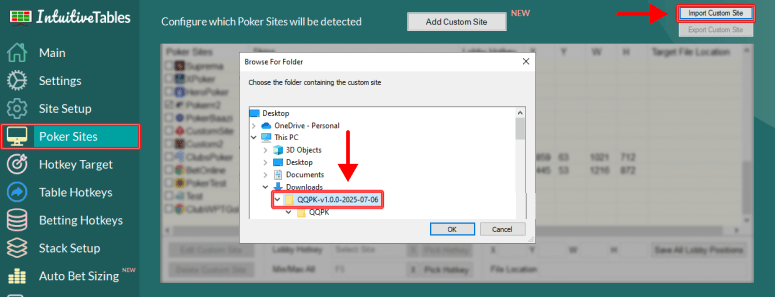
Once downloaded and unzipped, navigate to the Poker Sites tab and click "Import Custom Site" and select the extracted QQPK folder.
Note: After importing QQPK you will need to close and reopen IntuitiveTables.
-
Enable Hotkeys
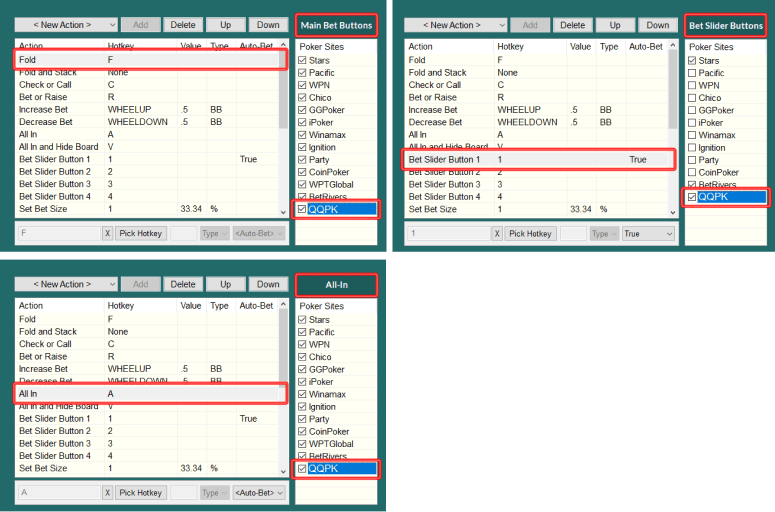
- After QQPK site is added and IntuitiveTables is reopened, you can enable QQPK in the Betting Hotkeys tab for each hotkey group you plan to use.
Note: For the most reliable hotkeys, we recommend keeping your table in a slot built by IntuitiveTables.
-
QQPK Options
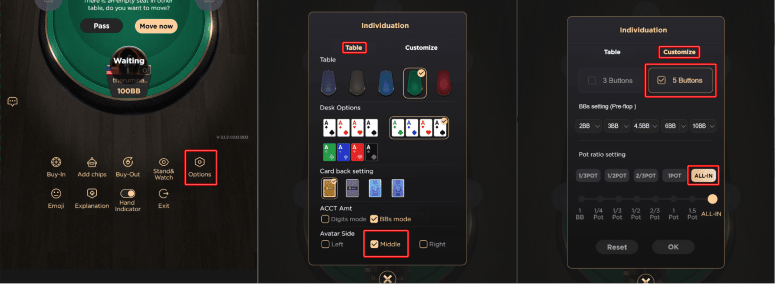
- Access QQPK options by clicking and dragging up on the bottom of a QQPK table.
- Make sure "Avatar Side" is set to "Middle".
- Enable 5 Buttons and configure the final bet button to "ALL-IN".
Note: It is not currently possible to set the 5th bet button to All-In for preflop which means the 10BB button will be clicked instead. We suggest contacting QQPK to request that the 5th bet button can be configured to "All-In" so that this hotkey can work properly.
-
Setup for Numpad Bet Sizing (Portrait Mode Only)
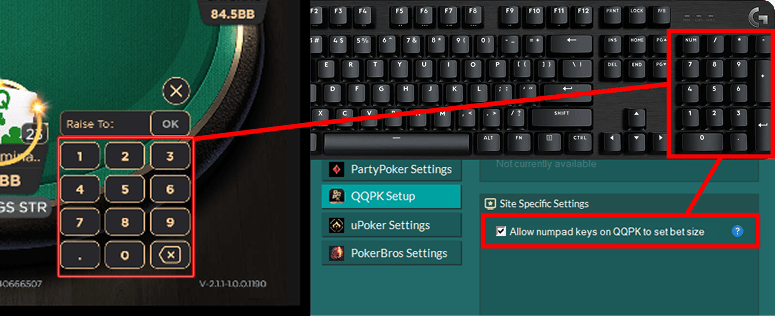
- In the Site Setup tab for QQPK, enable "Allow numpad keys on QQPK to set the bet size".
- This feature will allow Numpad0-9, NumpadDot, and NumpadSub (to delete a number) to type directly into the bet box to modify the sizing.
-
Troubleshooting
Does IntuitiveTables support Landscape mode for QQPK?
Yes! We have a custom site profile for Landscape mode you can use for table placement and overlays for QQPK with IntuitiveTables. The profile can be downloaded at Community Maintained Custom Sites. Make sure to download and import the "Landscape mode" QQPK profile.
How do I make my QQPK tables fit better in the grid in Portrait Mode?
If you use Portrait Mode for QQPK then these tables will be taller than normal tables. In order to fit emulator tables better in the grid, it is suggested to add specific emulator slots. To see how to do this, see steps #2 and #3 in the Emulators Guide.
How do I get my mouse wheel to work on QQPK in Portrait Mode?
In Portrait Mode QQPK has no + or - buttons for IntuitiveTables to click therefore we cannot add mouse wheel support. You can switch to LandScape mode inside QQPK and download and import the Landscape Mode QQPK custom site profile instead from Community Maintained Custom Sites.
Note: Still having an issue with QQPK? Ask in Discord or contact support@intuitivetables.com.
Back to Site SetupReady to get started?
The free two week trial includes access to all available features. No credit card is required.