
PartyPoker Setup
(NJ, MGM, Borgata,.com, ES, FR, CZE, Bwin, Coral, Crystal and more. )
Follow this guide to learn how to best configure your PartyPoker client for use with IntuitiveTables.
-
Note: PartyPoker advanced overlays and auto bet sizing has been added to IntuitiveTables v2.1.4.48 (or higher). To update, visit IntuitiveTables Versions and download the latest version at the top.
Advanced Overlays (Optional)
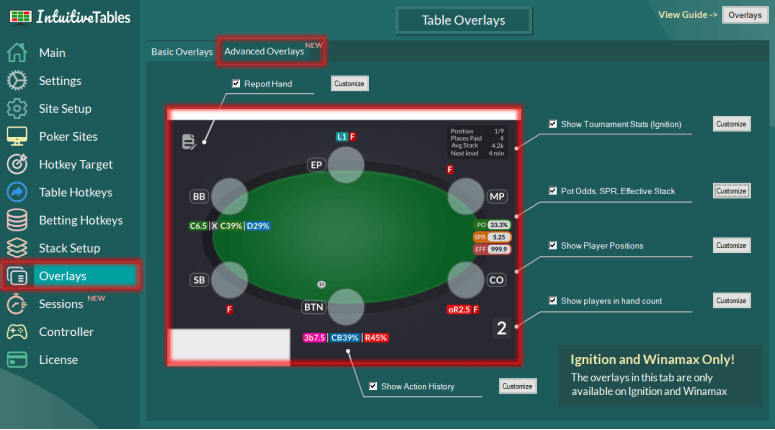
- Action History - See the history of actions, sizings, and player timings used throughout the hand with the Action History overlay HUD for PartyPoker.
- Utilities Overlay - View your Pot Odds, Stack to Pot Ratio, and Effective Stack overlays for PartyPoker.
- Facing Bet Overlay - View your Minimum Defense Frequency (MDF) and Outs Needed overlays when facing a bet.
- Player Positions - See the position of each seat on the table. All position texts can be modified and color coded in the "Customize" area.
-
Auto Bet Sizing (Optional)
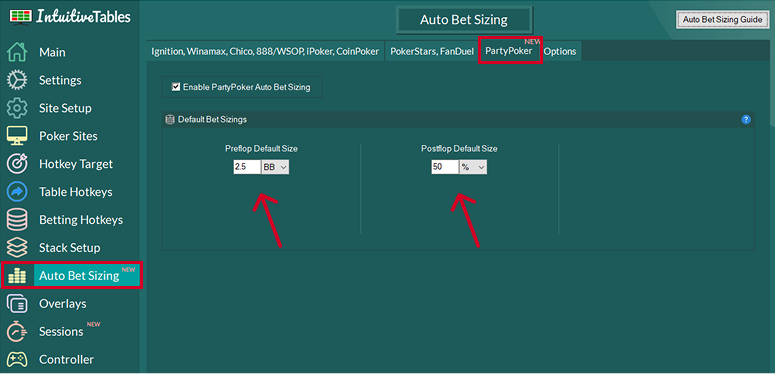
Automatic bet sizing for PartyPoker allows you to set a default bet size preflop and a default bet size postflop automatically on your turn with no hotkeys needed.
Note: PartyPoker only allows one bet size preflop and one bet size postflop for auto bet sizing, however you can use % pot or BB for either.
-
Disable Focus Stealing
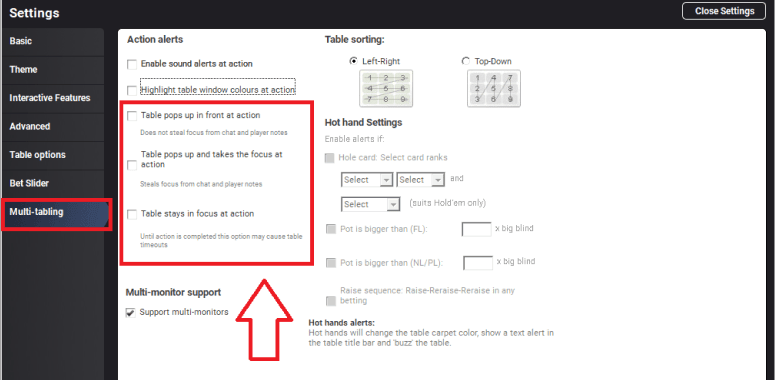
- It is suggested to disable pop to front and focus stealing here.
-
Troubleshooting
The main betting hotkeys such as Fold/Call/Raise aren't working.
IntuitiveTables only supports the English version of PartyPoker for these hotkeys. If possible, try reinstalling PartyPoker and choose "English".
Note: We now can support other languages besides English but will need your help! Please contact support if you need to use a language other than English for your PartyPoker client.
Advanced overlays and auto bet sizing stopped working after a PartyPoker update.
If your poker client has updated you may need to update IntuitiveTables. First check to see if the newest version of IntuitiveTables works on the new client update, and if not please contact support.
Advanced overlays and auto bet sizing are not working on my PartyPoker skin.
First make sure you are on the newest version of IntuitiveTables. If these features are still not working after updating please contact support with the name of your PartyPoker skin.
Tables don't pop to front or show bet buttons overlay
If your poker client has updated you may need to update IntuitiveTables. First check to see if the newest version of IntuitiveTables works on the new client update, and if not please contact support.
Note: Still having an issue with PartyPoker? Ask in Discord or contact support@intuitivetables.com.
Back to Site SetupReady to get started?
The free two week trial includes access to all available features. No credit card is required.