
iPoker Setup
(ChampionsPoker, FanDuel/Stars, Betfair, Bet365, RedStar, William Hill, and more)
Follow this guide to learn how to best configure your iPoker client for use with IntuitiveTables.
-
Advanced Overlays (Optional)
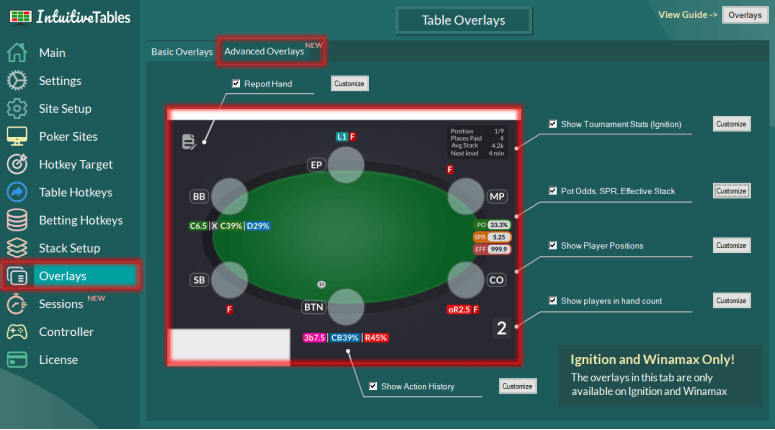
- Action History - See the history of actions, sizings, and player timings used throughout the hand with the Action History overlay HUD for iPoker.
- Utilities Overlay - View your Pot Odds, Stack to Pot Ratio, and Effective Stack overlays for iPoker.
- Facing Bet Overlay - View your Minimum Defense Frequency (MDF) and Outs Needed overlays when facing a bet.
- Next Street Overlay - Preview the Pot Size, Stack-to-Pot Ratio, and Effective Stack if your bet was to be placed using the Next Street Overlay.
- Bluff Equity Overlay - The Bluff Equity and Opponent pot odds overlay can give you an idea of how often your bluff needs to succeed before you place a bet.
- Player Positions - See the position of each seat on the table. All position texts can be modified and color coded in the "Customize" area.
Note: For seat-based overlays such as Action History, Positions, and Stack Sizes you will need to be in the bottom center seat.
-
Auto Bet Sizing (Optional)
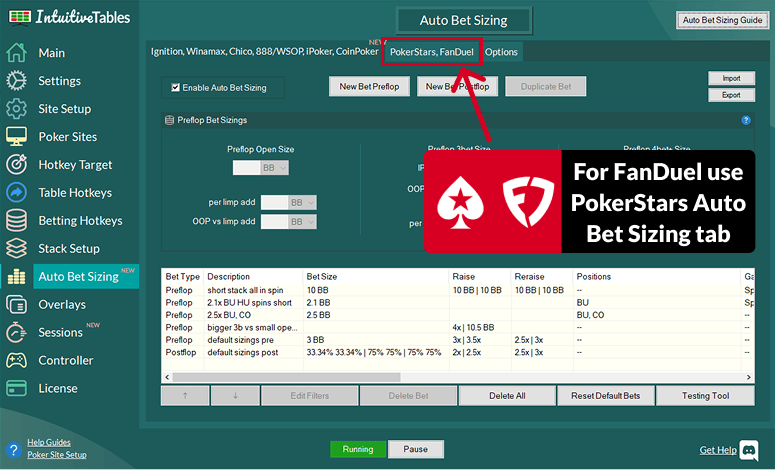
Automatic bet sizing for iPoker lets you set default bet sizes for preflop and postflop situations, drastically reducing the number of mouse clicks and hotkeys used each session.
Note: For FanDuel/Stars you will need to use the "PokerStars, FanDuel" tab since PokerStars has different rules when using this feature. For all other iPoker skins such as ChampionsPoker, RedStars, Bet365, etc you can use the default iPoker tab for Auto Bet Sizing.
-
Disable Focus Stealing
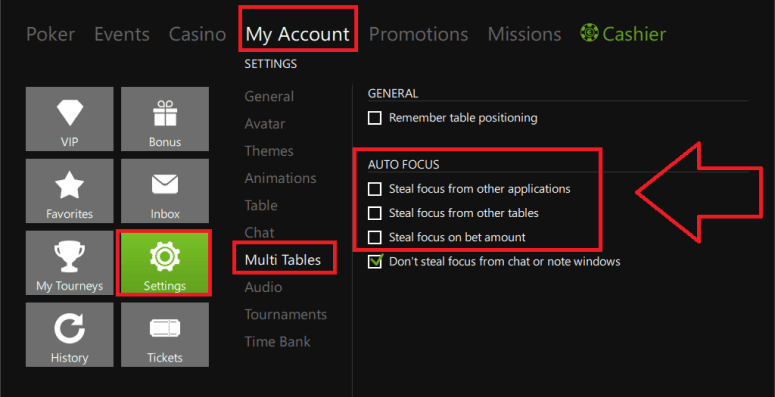
- Disable focus stealing by matching the settings above.
-
Configure Bet Buttons
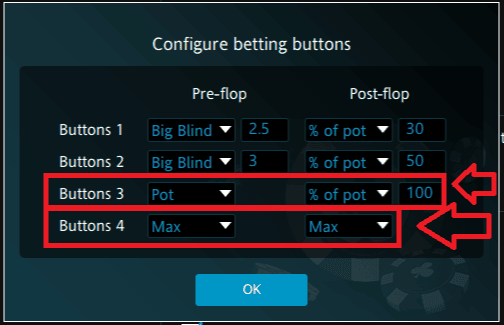
- For Set Bet Size hotkeys and bet buttons overlays to work properly, button 3 needs to be set to "Pot" Pre-Flop and 100% Pot Post-Flop.
- For the All-In hotkey to work properly, make sure bet button 4 is set to "Max" or "All-In".
Note: For IntuitiveTables v2.1.4.37+ and iPoker 25.7.x.x+ this step is now optional and is only used if your iPoker client updates and IntuitiveTables falls out of sync with the client.
-
Match Chips Converted State
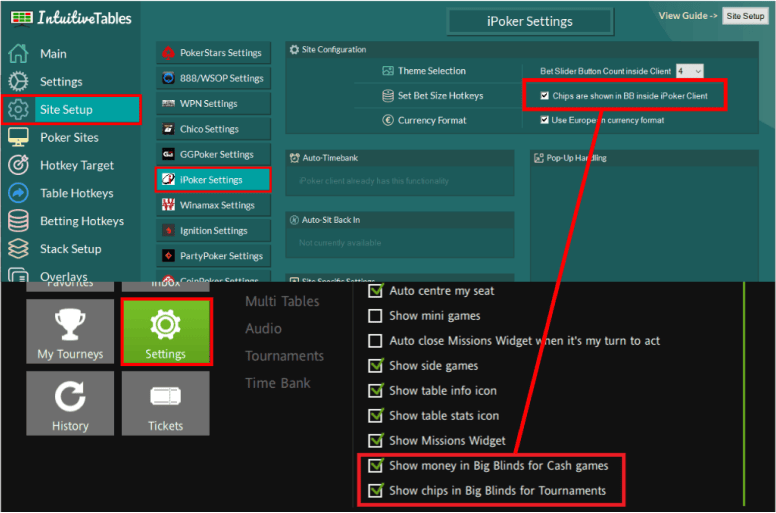
- If you converted your chips to BB inside your iPoker skin, you must update this inside IntuitiveTables settings as well.
Note: For IntuitiveTables v2.1.4.37+ and iPoker 25.7.x.x+ this step is now optional and is only used if your iPoker client updates and IntuitiveTables falls out of sync with the client.
-
Troubleshooting
Advanced overlays stopped working after an iPoker update.
If your poker client has updated you may need to update IntuitiveTables. First check to see if the newest version of IntuitiveTables works on the new client update, and if not please contact support.
Advanced overlays and auto bet sizing are not working on my iPoker skin.
If you play on an iPoker skin and it's not listed here please send us a message with the download link to your skin and we will see if we can add support.
- Supported (v25.7.x.x and higher)
- Admiral Poker
- Bet365
- Betfair
- Casino Barcelona
- Casino Holland
- Champions Poker
- Codere
- Coolbet
- FanDuel/PokerStars
- Goldbet
- Grossvenor
- Fortuna Poker
- Lottomatica
- PMU
- Redstar
- SkyPoker
- Sportium
- Svenska Spel
- Veikkaus
- Paddy Power
- PartyPoker.es
- PartyPoker.fr
- Betsafe
- Betsafe.ee
- Betsafe.pe/es
- Betsson
- Poker Guts
- Nordicbet-se
- NetBet
- William Hill
- Win2Day
- Not supporting (waiting for clients to update)
- Parions Poker (x86)
If you are using one of the "not supported" versions we would suggest emailing your support to find out when they plan to update to the latest iPoker versions (then let us know!).
Tables don't pop to front or show bet buttons overlay
If your poker client has updated you may need to update IntuitiveTables. First check to see if the newest version of IntuitiveTables works on the new client update, and if not please contact support.
- Supported (v25.7.x.x and higher)
Note: Still having an issue with iPoker? Ask in Discord or contact support@intuitivetables.com.
Back to Site SetupReady to get started?
The free two week trial includes access to all available features. No credit card is required.